Temperatures Near Cumberland Center, Maine from Four Volunteer Meteorological Stations
Data provided graciously by https://weather.gladstonefamily.net
and the Citizen Weather Observer
Program. Also the NOAA National Weather Service.
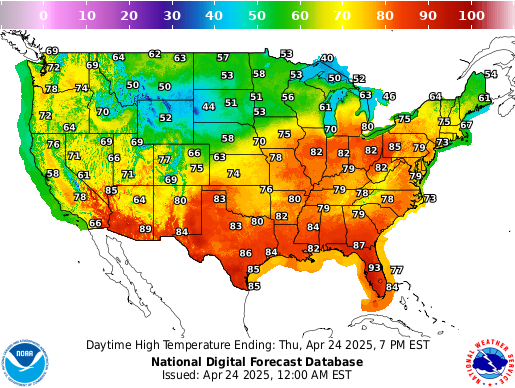
Other National maps. This one is Interactive
The source code for collecting data and generating charts is available on request. Charts are refreshed nightly.
Data Quality
View Data Quality Report - Monitor data freshness, completeness, range validation, energy trends, and seasonality patterns across all weather stations and energy data sources.
Temperature Charts

Figure 1. Weekly air temperatures for the previous 12 weeks at the four observation stations.
In all charts, Max Data is the latest measurement from the database. This Week, or this whatever time period, is the date the chart was generated.
Variance between the two indicates that either data for the current day is not available in the database for some reason (if This Week is later than Max Data) or someone went back in time and ran the chart scripts before the data were loaded (if This Week is earlier than Max Data).

Figure 2. Yearly comparison of weekly average air temperatures at station e4279

Figure 3. Yearly comparison of weekly average air temperatures at station KPWM

Figure 4. Comparison of a few years of temps for the last 30 days of daily temps for station KPWM agentically coded by Claude.ai
G-Series CWOP Stations
These are newer Citizen Weather Observer Program (CWOP) stations in the area, started in 2024-2025.
G5290 (Started Aug 2024)

Weekly average temps by week number |

60-day daily temperature comparison |
G5544 (Started Nov 2024)

Weekly average temps by week number |

60-day daily temperature comparison |
ZASTMET Real-Time Data

Figure 5. Last 48 hours of 5-minute data from the ZASTMET station. Made by both Copilot and Claude

Figure 6. Full record of 5-minute data from the ZASTMET station. Made by both Copilot and Claude

Figure 7. Wind conditions over the previous 24 hours at ZASTMET

Figure 8. Wind conditions over the previous 24 hours at KPWM
 Figure 9. KPWM Weekly temperature and electricity for the period of record |
 Figure 10. E4279 Weekly temperature and electricity for the period of record |

Figure 11. KPWM Daily temperature and electricity for the last 60 days
Daily cost is metered kWh priced at the current CMP marginal rate (volumetric delivery + Standard Offer supply, taken from the latest uploaded bill and shown in the title). Since solar, the SolarEdge lines price grid import and total household consumption the same way. A fixed $0.18/kWh was used until April 4, 2023 and $0.25/kWh after that.

Figure 12. Monthly utility deliveries: electricity taken from the grid (kWh, CMP meter) with natural gas (therms) stacked above it. The electricity segment is deliberately grid import rather than household consumption, because grid import is what the bill in Figure 13 charges for. Since the array was commissioned in January 2026 the panels supply part of consumption directly, so the segment shrinks even though consumption did not; Figure 15 shows total consumption. kWh and therms are stacked for visual comparison only, and the combined bar height has no physical meaning.

Figure 13. Monthly gas and electricity cost in dollars, as billed. Hollow blue markers from March 2026 show what electricity would have cost at the standard tariff without solar; the bars beneath them are the credit-reduced bills actually paid.

Figure 14. Annual gas and electricity cost in dollars, as billed. The hatched segment on the current year is electricity cost avoided by solar: the standard-tariff cost of true consumption minus the credited bills, for the months billed so far (see Figure 35 for the running total).

Figure 15. Total household electricity use since 2014, summed into equal 30.4-day periods so every bar covers the same span. Before solar every kilowatt-hour came from the grid, so the CMP meter is the whole story. From the commissioning date the bar is SolarEdge-monitored consumption, with the share the panels supplied directly hatched in orange at the top of the bar; the solid blue below it is what the grid delivered. Periods missing more than 10% of their days are left out, which is the gap in 2020. Consumption has not fallen since solar; the grid share has.

Figure 16. Annual energy used by the house since 2017, gas and electricity converted to one unit (MMBtu) and stacked so the bar height is total utility energy for the year. Gas is 1 therm = 0.1 MMBtu; electricity is 1 kWh = 0.003412 MMBtu and is household consumption, split since January 2026 into the part still taken from the grid and the part the solar array supplied directly. The current year is hatched and marked year to date, with the bill and meter coverage dates in the note.

Figure 17. Weekly electricity use against average temperature at KPWM before the year 2020

Figure 18. Weekly electricity use against weekly cumulative Heating Degree Days (HDD) using the 65 degree point at KPWM before the year 2020
From weather.gov
Degree days are based on the assumption that when the outside
temperature is 65°F, we don't need heating or cooling to be comfortable.
Degree days are the difference
between the daily temperature mean,
(high temperature plus low temperature divided by two) and 65°F. If the temperature mean is above 65°F, we
subtract 65 from the mean and
the result is Cooling Degree Days. If the temperature mean is below 65°F, we subtract the mean from 65 and the
result is Heating Degree Days.
days occur in the summer and occasionally in the fall

Figure 19. Weekly electricity use against average temperature at KPWM for the year 2020 and after

Figure 20. Weekly electricity use against weekly cumulative Heating Degree Days (HDD) using the 65 degree point at KPWM for the year 2020 and after

Figure 21. Annual energy cost and use since 2017. The top panel is the amount billed each year for electricity, natural gas, and the two together. The bottom panel is the energy those bills delivered, with gas (1 therm = 0.1 MMBtu) and grid electricity (1 kWh = 0.003412 MMBtu) converted to the same unit and stacked, so the bar height is total utility energy for the year. The current year is hatched and marked year to date; its bills and meter data end on the dates shown in the note. From 2026 the electricity cost falls because net-metering credits offset the bills, not because the price of electricity fell, and the electricity bar shrinks because the grid now delivers only what the solar panels do not cover; Figures 24, 25 and 35 show the price and the savings.

Figure 22. Monthly electricity costs for each kwh used as a scatter plot.
The entire electric bill is used to calculate cost. Therefore if the delivery costs go up, but the commodity (cost of each kwh from the supplier) stays the same, the apparent cost to deliver the electricity will still rise. This shows any possible relation between khws used and the cost per kwh.
Colors highlight the drift upward over time. Hollow markers from March 2026 plot true household consumption against its cost at the standard tariff; the billed points for those months would all sit at the $30 delivery minimum.

Figure 23. Monthly electricity dollars (cents) for each kwh over time.
The entire electric bill is used to calculate cost. Therefore if the delivery costs go up, but the commodity (cost of each kwh from the supplier) stays the same, the apparent cost to deliver the electricity will still rise.
This should show a rise over time of cost per kwh as delivered to the house, which incorporates both commodity as well as infrastructure/business cost changes. From March 2026 (hatched bars) the value is the standard tariff on true consumption rather than the credit-reduced bill, as in Figure 24.

Figure 24. Monthly cost per unit of energy delivered — electricity (left axis, $/kWh, blue) and natural gas (right axis, $/therm, red) over the full period of record. Electric data begins Nov 2015; gas data begins Dec 2016. Both series use actual billed totals divided by metered consumption from v_monthly_utilities_better. From March 2026 (hollow markers) the electricity series is instead the standard tariff — the delivery minimum charge, volumetric delivery rate and Standard Offer supply rate taken from the uploaded CMP bills — applied to true household consumption from SolarEdge monitoring. Once the rooftop array was earning net-metering credits the bill itself fell to the $30 delivery minimum, so bill ÷ kWh measured the size of the solar offset rather than the price of electricity; the tariff-based series keeps the chart answering "what does a kWh cost". Dual axes are needed because the two units are not directly comparable: 1 therm = 100,000 BTU, while 1 kWh ≈ 3,412 BTU.

Figure 25. Annual average cost per unit of energy delivered — electricity (left axis, $/kWh, blue bars) and natural gas (right axis, $/therm, red bars), aggregated from the monthly data shown in Figure 24. Error bars span the full monthly min–max range within each year, reflecting seasonal rate variation. Dashed lines show the linear trend for each series over the period of record. As in Figure 24, electricity from March 2026 onward is priced at the standard tariff on true consumption rather than the credit-reduced bill. * Current year is partial (year-to-date only).
Energy Analysis
View Energy Analysis - Statistical analyses of how weather drives this home's energy use, on their own page: temperature response and hour-of-day load profiles, efficiency change points, summer cooling and humidity, wind effects on heating, weather-station comparison, anomaly detection, cost per degree-day, bill-vs-meter and net-metering reconciliation, and balance-point shift.
Residential Solar
Installed system (January 2026): 12.18 kW DC — 29 × REC420AA Pure 2 heterojunction modules (420 W, 21.7% efficiency, −0.24%/°C) with a per-module SolarEdge S440 optimizer, feeding a SolarEdge SE11400H-US Home Hub inverter (11.4 kW AC, 99% CEC efficiency, DC/AC ratio 1.07). Roof-mounted at tilt 37°, azimuth 215° (WSW). Grid-tied and net-metered with CMP; no battery (inverter is storage-ready). Module warranty 25 yr at 0.25%/yr degradation. Monitoring is revenue-grade, reporting to SolarEdge every 15 minutes.
Modeled expectations: two independent unshaded models agree within 1.3% — the installer design estimate (15,441 kWh/yr) and a PVGIS-5 run at the exact roof geometry (15,649 kWh/yr, ≈1,285 kWh/kWp). The steep 37° tilt flattens seasonality (July only ~1.9× December), which suits this home's winter heat-pump load. Tree shading and snow are not in these models; the design-vs-actual analysis below measures the real-world correction from monitoring data continuously and re-projects the current year and the 25-year outlook from it.
The charts below show how solar energy flows through the home: production is split between direct home use ("To Home") and export to the grid ("To Grid"), while consumption shows what comes from solar versus grid import.
Daily Energy Summary

Figure 26. Daily Energy Bars - Horizontal stacked bars showing today's energy breakdown. Production shows solar energy generated, split into power used directly by the home (green) and exported to the grid (blue). Consumption shows total home energy use, split between solar-sourced (light blue) and grid-imported (orange).
Daily Power Flow

Figure 27. Daily Site Power - 15-minute resolution power flow throughout the day. Production appears above the zero line, consumption below. The overlap of "To Home" and "From Solar" represents self-consumed solar energy. Peak production typically occurs around solar noon; morning and evening grid imports cover demand when solar production is insufficient.
Weekly Energy Summary

Figure 28. Weekly Energy Bars - Daily production and consumption totals for the past week. Day-to-day variation reflects weather conditions (cloud cover reduces production) and household activity patterns. The stacked colors show the breakdown between self-consumption, grid export, and grid import.
Weekly Power Flow

Figure 29. Weekly Site Power - Seven days of 15-minute power data showing the daily solar generation pattern. Clear days show smooth bell curves; cloudy days show irregular production. This view helps identify weather impacts and consumption patterns over the week.
Net Energy Balance

Figure 30. Weekly Net Energy - Daily net energy balance (production minus consumption). Blue bars above zero indicate days when solar production exceeded household consumption (surplus exported to grid). Orange bars below zero indicate days when consumption exceeded production (deficit imported from grid). This view quickly shows whether the home is a net producer or consumer on any given day.

Figure 31. Monthly Net Energy - Monthly net energy balance showing the cumulative effect over longer periods. Positive months (blue) indicate net energy export to the grid; negative months (orange) indicate net grid import. Over a full year, this chart will reveal seasonal patterns - expect surpluses in sunny months and deficits in winter when days are shorter and heating loads higher.
Monthly Energy Summary

Figure 32. Monthly Energy Bars - Monthly production and consumption totals for all available data, using the same side-by-side stacked bar layout as the weekly chart (Figure 28). Each month shows two bars: Production (left) split between energy used directly by the home (green) and exported to the grid (blue); Consumption (right) split between solar-sourced (light blue) and grid-imported (orange). Seasonal patterns are clearly visible — summer months show high production with significant grid export, while winter months show lower production and heavier grid import to meet household demand.
Design vs. Actual Production
View Solar Design-vs-Actual Report - A narrative assessment, rebuilt nightly, of how measured production compares to the PVGIS design model month by month, the learned real-world correction factor, and continuously re-adjusted projections for the current year and the 25-year system life.

Figure 33. Modeled vs. Actual Monthly Production - Monthly SolarEdge production measured against the unshaded PVGIS design model. The ratio panel tracks actual/model by month; the learned correction factor (production-weighted over complete months) turns the unshaded model into a measured real-world expectation, absorbing tree shading, snow, and weather in one number that sharpens as months accumulate.

Figure 34. Adjusted Production Outlook - The current year assembled from measured months plus correction-adjusted model for the remainder, then projected across the 25-year module warranty life at 0.25%/yr degradation. Shown against the unshaded model ceiling and the installer design estimate for context.
Will Solar Cover the House?
Bottom line: measured to date, the system can deliver this household's annual electricity needs. The house uses about 14,731 kWh per year (average of 2021–2025); the array's measurement-adjusted output is 15,551 kWh per full year — 106% of annual needs.
Panel aging (0.25%/yr) erodes this slowly: coverage stays above 100% until 2048, ending the 25-year warranty life at 99%.
For 2026 itself (a partial year — commissioned January 28), estimated production of 14,910 kWh covers 101% of the needs baseline. Consumption is currently pacing 17,541 kWh/yr (above the historical average — watch this: rising use shrinks coverage).
Coverage is an annual statement, not a monthly one: so far in 2026 the house was a net exporter in April, May, June and a net importer the other months. Under CMP net-energy billing the summer surplus banks as credits (12-month rolling) that pay down winter deficits — which is why the annual number is the one that matters.
Recomputed 2026-10-23 12:37 AM EDT from SolarEdge monitoring, the CMP interval meter, and the PVGIS design model (correction factor 0.994, 8 complete months). Method and detail: Solar Design-vs-Actual Report.
Bill Savings from Solar

Figure 35. Solar Bill Savings vs. Standard-Rate CMP Bills - For every CMP billing window since the array began earning net-metering credits, the blue bar is what CMP would have billed without solar: true household consumption (SolarEdge monitoring, or meter import + production − export) priced at the tariff printed on that window's own bill — the delivery minimum covering the first 50 kWh, the volumetric delivery rate above that, and the Standard Offer supply rate. The green bar is the actual CMP bill (delivery + supply). The lower panel accumulates the difference. Hatched windows fall after the most recent uploaded bill and are estimates: measured consumption at the last known tariff, with the actual bill modeled from a running net-metering credit bank; they are replaced by real figures as bills are uploaded. Arcadia community-solar statements, which ended in February 2026, are excluded. The yellow box compares cumulative savings against the actual amount paid for the system, $38,810.59.

Figure 36. Solar Payoff - The cumulative savings from Figure 35 drawn against the up-front cost of the system, $38,810.59, with no federal tax credit received. The solid line is measured savings by billing window (hollow marker: the current, not-yet-billed window). The dashed line carries the measured savings pace forward at today's tariff; the dotted line applies the 4%/yr rate escalation the installer's proposal assumed; the dash-dot line applies the electricity price rise actually measured here over the previous three years, a log-linear fit of the annual median $/kWh from the Figure 24 series through the current year to date, with the rate shown in the legend. Diamonds mark where each projection crosses the system cost. The pace is billed savings divided by billed days, annualised, so it firms up as more windows are billed and will shift with the first winter, when consumption is highest. Projections assume consumption stays at today's level and that summer net-metering credits keep covering winter deficits, which the annual-coverage analysis above supports.

Figure 37. Rooftop solar array configuration at the home base. The 12.18 kW system whose production data is tracked throughout this page.
stations
Layers
Figure 38. Interactive map served from weathermap.fluidgrid.site via MapLibre GL and PMTiles

Figure 39. Plumbing. This is how this site is maintained.
- Data is stored in a Maria DB database (fomerly MySQL) with a ton of views for easy data extraction and concise, centralized aggregation.
- Data shuffling logic is done with BASH shell scripts and the presentation (charts) is performed with matplotlib glued to the database through sqlalchemy, pandas, and numpy -- all Python libraries.
- Data operations all run on a Raspberry Pi 3B in the basement. The page and image you see are all static from a shared host and are updated nightly by jobs from the Pi.

Figure 40. A naked Raspberry Pi 3B

Figure 41. The Pi in action. USB-powered and connected over WiFi.
Page Last modified: October 23, 2026